-->

Cool ?

Showing posts with label Traffic. Show all posts

Sunday, February 5, 2012

Google webmaster tools | A quick look


What are Google webmaster tools ?

Simply "Google webmaster tools" is a Free service that provides you some cool tools to find you way to be a successful webmaster. only thing you need to know is "How to use them!" I have mentioned about is in a SEO related post. ( Add your blog and sitemap to google ) Ohh.. forgot to say. Google changed the interface and facilities a bit after the last post. But it did not any big change on the task what we were doing in the post.

What is inside the webmastertools

 Google webmaster tools


Please Note: This is just a "quick look". Let's discuss about them in the future.

Saturday, January 21, 2012

Find sites to get FREE backlinks manually


High quality, By commenting, From any domain you need

find sites to comment backlinks

Saturday, December 31, 2011

One TIme PopUp for Blogger | Like Box | Subscription Box|..


Monday, November 14, 2011

Create a Google plus page for blog


[This is the Part two of  "Increase Blog Traffic with Google plus" ]

Create a Google Plus Page

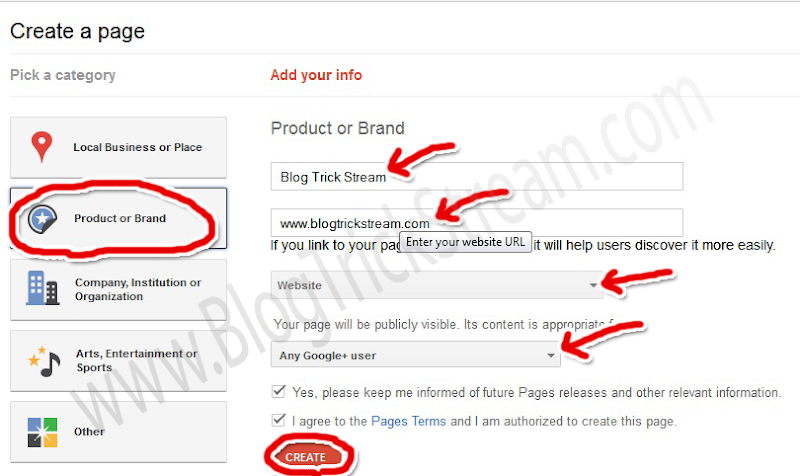
Google Plus Now allow you to create fan pages too. It'll be a Good chance to you and your readers that who do not use facebook. Let's see How to create a Page. 1st Got Page creator And select the option "Product or Band". Then Add your Blog Name in the name field and Add the URL in website field.
       Then select The category as "Website" Then select who can see the page. If you admin an Adult or an Alcohol related blog please remember to choose the right people to view the page.
Create a page in Google plus
       Once you have completed Click "Create" button. And Upload a Great Profile picture (You can Use your ad banner if you are advertising ) . Now you are Done with creating a Page.
          After a Successful creation. you will use Google Plus as your page. Any time you want to switch the profile, you can Got to home tab and click the drop down menu in just next ti your profile picture And choose the account.
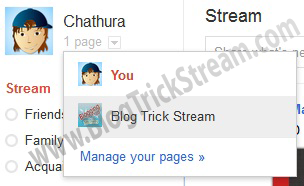
switch Google plus account

Add Google Plus badge to your blog

Go to your home tab as your page, Then take a look at your address bar. There will be your profile id in it. (See example in the picture).

Copy your ID to the clip board And Go to "Google Plus badge creator"  Then paste your ID in the field and select the type of the badge you want (Some are still not available).
           Get the code and paste it in you blog as a widget.


Have you a fan Page on Facebook which contains your RSS feed? If not, Create one now.
[This is the Part two of  "Increase Blog Traffic with Google plus" ]

Please Subscribe via Email for more...


Saturday, October 29, 2011

Increase blog traffic with Google plus


Which methods to Use?

Boost your blog traffic with Google plus is a something more than share your post links in stream. If you have read my last two posts about,
Increase blog traffic with Twitter and Increase Blog traffic with Facebook to the very end, you know how my idea works in real-time. Now let's see what can we do with this "plus "
  1. Add your blog Links to profile
  2. Share links in stream (Not with the regular way)
Important: Before you do this, you have to add peoples to your circles as may as you can. Then they will add you back (70% do so) and they will see your posts in the stream.so you can catch there ides. (It'll be helpful for another step. you'll see why, continue reading)

Thursday, October 27, 2011

Floating Stumbleupon, Digg, Twitter, Plus One and Facebook Share button with counters


Why You must add This?

Floating social media widget Digg And plus One are Social bookmarking sites. So with Digg, you can become top of the search engine results for the keywords That you can't get with your blog. because Digg has a top PR.when many people suggest your blog by digging, It will be on top.
Plus one is another Important thing to suggest your blog to others, specially It's a Google program. That's why this become so important.when you get more +1s it means your page that contains them will be suggest to others by Google.
When talking about Facebook Share button. I think i don't have to describe about it. It's so important to get more visitors (Traffic) Twitter is same.

Thursday, October 13, 2011

How to Customize "LinkWithin" Text and Text style with CSS


change linkwithin text

What is LinkWithin Widget?

It's a widget that will boost your traffic.
How........? It'll show some random post of your blog, (see below this post) below every post. most of bloggers use it.
Cuz readers can spot some interesting post easily with this widget. So they won't leave your blog early.
Add the widget by from official site

But there is no option to change its text or text style. but here i have found a easy way to customize them.

Saturday, September 17, 2011

Increase Blog traffic with Facebook


In The Last post i got lot of request to write about Facebook Traffic. And I know you don't need to read about some general non working methods.

So, Which method to use

  1. Fan page 
  2. Status update
  3. Posting on Group walls
  4. Creating docs 
  5. Getting shared by others

Monday, September 12, 2011

Increase blog traffic with Twitter


Which methods to use


Drive traffic with twitter
  1. Tweet your link bites withe twitter directly 
  2.  Re tweeting by others


So That's so simple than you ever though. Let's see how.!


Tuesday, August 30, 2011

3 Useful sites for a new coming blogger


Drive traffic using EntreCard

This is a wonderful place that allow you to place your banner ads on some others sites. just you have to place there ads on your blog. most of the expert bloggers are using this to drive traffic. because it hasn't a uncompleted look as other ad exchange iframes.
                  There is a credit system as a alternative for money. you just have to earn some credit to display ads on others sits. the good thin is you will get credits when some one click an ad on you blog. also by referring peoples.

Thursday, August 18, 2011

Add meta tags to find you blog or web site easily


Meta tags

Meta tags are like some guide to find, and add yo blog/website to search engines. most of search engines are categorizing sites to provide better search results for users. You know that search engines are the most important sours of visitors, so that's why meta tags are important.


x

Please Use 10 seconds to Make Us World Wide

A Pluse One will be a great support...
...........................................................................


Also a Like on the Facebook Page
...........................................................................


Get This