-->

Cool ?

Showing posts with label visitors. Show all posts

Thursday, January 26, 2012

Review | Domain Yahoo for your small business


Domain Yahoo

: Official link : Domain yahoo

 Yahoo small business is offering some cheap but high quality start to new coming peoples at e-business .

♦ Let's see what's interesting!

Low price for 1st 5 years
In comparing with other trusted domain name registrars such as eNom and Godaddy , Yahoo domain costis really low in first five years
It just cost $9.95 for the first year (You can decrees mire with FREE coupon codes.)  You can take this offer up to 5 years if you need ($49.75 for 5years) recommended .


A FREE starter web page 
" A single web page where you can post basic details about your business, such as a brief description and contact information. A starter web page is a bonus feature you receive when you purchase a Yahoo! Domains or Business Email plan."

Great one for who do not buy the domain only for a blog.

Trusted around the cyber
Huh!I don't have to specify the thing for that. you know the position of Yahoo.


Also................ 
Domain locking, Private domain registration and domain forwarding are available!


♦ What's not so cool!

After the first term the cost is too high...

After the first term, the cost is $34.95/year. But after the first term you are richer than you started, so it's not a big deal! You will also find coupon codes in the future if you keep in touch with them.


Just for now.... do not thing about the price after the first term. Yahoo domain is really for small businesses that willing to earn some real money. and who need to start cheap!

Hope you will found this post interesting! Do not trust my words, just check there website out!

Saturday, January 21, 2012

Find sites to get FREE backlinks manually


High quality, By commenting, From any domain you need

find sites to comment backlinks

Saturday, December 31, 2011

One TIme PopUp for Blogger | Like Box | Subscription Box|..


Monday, November 14, 2011

Create a Google plus page for blog


[This is the Part two of  "Increase Blog Traffic with Google plus" ]

Create a Google Plus Page

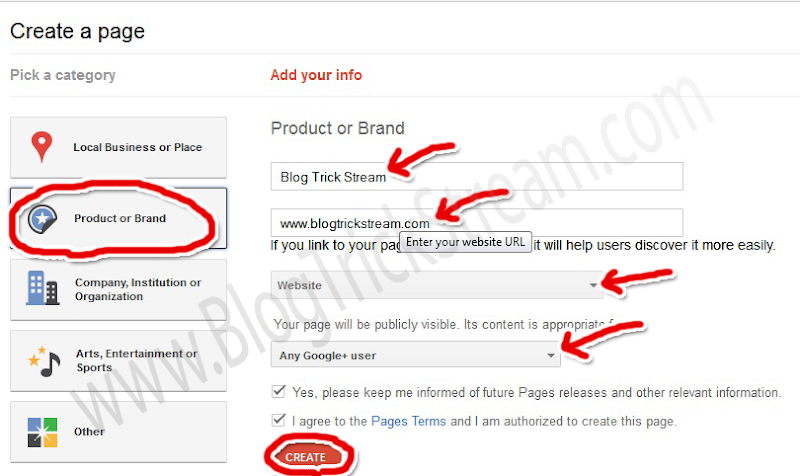
Google Plus Now allow you to create fan pages too. It'll be a Good chance to you and your readers that who do not use facebook. Let's see How to create a Page. 1st Got Page creator And select the option "Product or Band". Then Add your Blog Name in the name field and Add the URL in website field.
       Then select The category as "Website" Then select who can see the page. If you admin an Adult or an Alcohol related blog please remember to choose the right people to view the page.
Create a page in Google plus
       Once you have completed Click "Create" button. And Upload a Great Profile picture (You can Use your ad banner if you are advertising ) . Now you are Done with creating a Page.
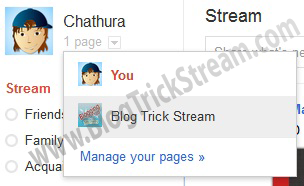
          After a Successful creation. you will use Google Plus as your page. Any time you want to switch the profile, you can Got to home tab and click the drop down menu in just next ti your profile picture And choose the account.
switch Google plus account

Add Google Plus badge to your blog

Go to your home tab as your page, Then take a look at your address bar. There will be your profile id in it. (See example in the picture).

Copy your ID to the clip board And Go to "Google Plus badge creator"  Then paste your ID in the field and select the type of the badge you want (Some are still not available).
           Get the code and paste it in you blog as a widget.


Have you a fan Page on Facebook which contains your RSS feed? If not, Create one now.
[This is the Part two of  "Increase Blog Traffic with Google plus" ]

Please Subscribe via Email for more...


Saturday, October 29, 2011

Increase blog traffic with Google plus


Which methods to Use?

Boost your blog traffic with Google plus is a something more than share your post links in stream. If you have read my last two posts about,
Increase blog traffic with Twitter and Increase Blog traffic with Facebook to the very end, you know how my idea works in real-time. Now let's see what can we do with this "plus "
  1. Add your blog Links to profile
  2. Share links in stream (Not with the regular way)
Important: Before you do this, you have to add peoples to your circles as may as you can. Then they will add you back (70% do so) and they will see your posts in the stream.so you can catch there ides. (It'll be helpful for another step. you'll see why, continue reading)

Thursday, August 18, 2011

Add meta tags to find you blog or web site easily


Meta tags

Meta tags are like some guide to find, and add yo blog/website to search engines. most of search engines are categorizing sites to provide better search results for users. You know that search engines are the most important sours of visitors, so that's why meta tags are important.


x

Please Use 10 seconds to Make Us World Wide

A Pluse One will be a great support...
...........................................................................


Also a Like on the Facebook Page
...........................................................................


Get This