Cool ?
Wednesday, March 14, 2012
Sunday, February 5, 2012
Google webmaster tools | A quick look
What are Google webmaster tools ?
Simply "Google webmaster tools" is a Free service that provides you some cool tools to find you way to be a successful webmaster. only thing you need to know is "How to use them!" I have mentioned about is in a SEO related post. ( Add your blog and sitemap to google ) Ohh.. forgot to say. Google changed the interface and facilities a bit after the last post. But it did not any big change on the task what we were doing in the post.What is inside the webmastertools


Please Note: This is just a "quick look". Let's discuss about them in the future.

|

|

|

|

|

|

|

|

|

|

|
Thursday, January 26, 2012
Review | Domain Yahoo for your small business
Domain Yahoo
: Official link : Domain yahooYahoo small business is offering some cheap but high quality start to new coming peoples at e-business .
♦ Let's see what's interesting!
Low price for 1st 5 years
In comparing with other trusted domain name registrars such as eNom and Godaddy , Yahoo domain costis really low in first five years
It just cost $9.95 for the first year (You can decrees mire with FREE coupon codes.) You can take this offer up to 5 years if you need ($49.75 for 5years) recommended .
A FREE starter web page
It just cost $9.95 for the first year (You can decrees mire with FREE coupon codes.) You can take this offer up to 5 years if you need ($49.75 for 5years) recommended .
A FREE starter web page
" A single web page where you can post basic details about your business, such as a brief description and contact information. A starter web page is a bonus feature you receive when you purchase a Yahoo! Domains or Business Email plan."
Great one for who do not buy the domain only for a blog.
Trusted around the cyber
Huh!I don't have to specify the thing for that. you know the position of Yahoo.
Also................
Domain locking, Private domain registration and domain forwarding are available!
♦ What's not so cool!
After the first term the cost is too high...
After the first term, the cost is $34.95/year. But after the first term you are richer than you started, so it's not a big deal! You will also find coupon codes in the future if you keep in touch with them.
Just for now.... do not thing about the price after the first term. Yahoo domain is really for small businesses that willing to earn some real money. and who need to start cheap!
Hope you will found this post interesting! Do not trust my words, just check there website out!
|
|
|
|
|
|
|
|
|
|
|
|
Saturday, January 21, 2012

Saturday, December 31, 2011

Thursday, December 15, 2011
Cool Gradient Background to Blog Sidebar

Gradient background with rounded corners will be perfect to your Blogs side bar, If you do not believe me just take a look at the Demo. Of course you can change the gradient to any color or a style. Also the Widget Headers, See "How to customize widget headers" first.
|
|
|
|
|
|
|
|
|
|
|
|
Tuesday, December 6, 2011
CSS Gradients to Customize widget headers differently
Customize Blog Template Your Self
Getting free templates or buying low quality templates will let your blog down in search engine rankings. Also most of them are not user friendly. Because that kind of template has so many unwanted styles and scripts which will slow your blog's load time and make it looks like a Christmas tree with too much decorations.
The best solution is to make and style the template your self. But most people don't know how to create one. I have a solution for that too. You can customize a ready-made template from Blogger.
That's why I have decide start a cool post series called " Make your Own Template " This is the starting post. I thought starting with a simple post will give the series a bless to keep up.
.
|
|
|
|
|
|
|
|
|
|
|
|
Monday, December 5, 2011
Advantages of customizing Google +1 button

Customizing Google plus one (+1) button was not that hard with the post about "How to customize the +1 button" right? But if you are confused about why, and how to make it effective, So this is the post for you.
|
|
|
|
|
|
|
|
|
|
|
|
Monday, November 21, 2011
How to Customize +1 Button in Different Ways
Customizing the Plus One button is a option that provided by official Google developer site. But Here is the complete description and guide with demos.

Customize +1 button
Before All
before all, you have to copy this code and past it Just before the </head> tag.|
|
|
|
|
|
|
|
|
|
|
|
How to Set your Plus One tab to public.
How to Set Google PluseOne Tab to Public
First log into your Google account (Google+) Then Go to the profile tab from the navigation bar at Next to Google+ logo.

Then click on the +1 Tab. (as in the picture).
|
|
|
|
|
|
|
|
|
|
|
|
Monday, November 14, 2011
Create a Google plus page for blog
Create a Google Plus Page
Google Plus Now allow you to create fan pages too. It'll be a Good chance to you and your readers that who do not use facebook. Let's see How to create a Page. 1st Got Page creator And select the option "Product or Band". Then Add your Blog Name in the name field and Add the URL in website field.Then select The category as "Website" Then select who can see the page. If you admin an
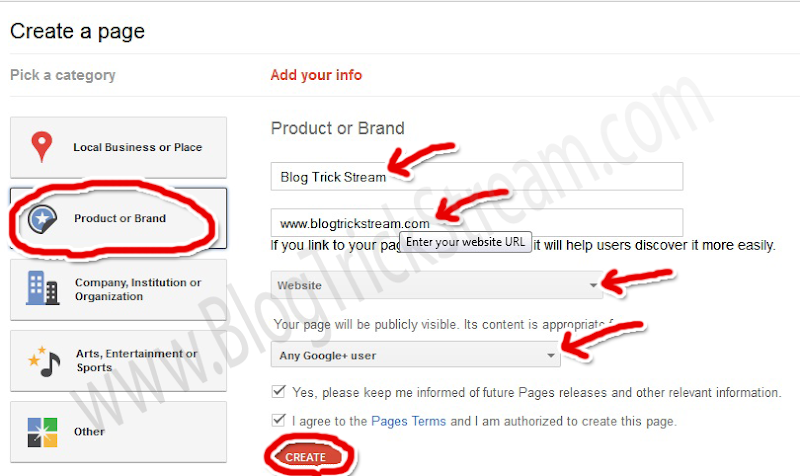
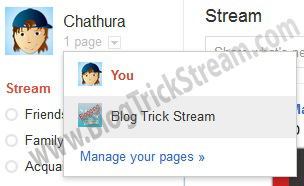
After a Successful creation. you will use Google Plus as your page. Any time you want to switch the profile, you can Got to home tab and click the drop down menu in just next ti your profile picture And choose the account.
Add Google Plus badge to your blog
Go to your home tab as your page, Then take a look at your address bar. There will be your profile id in it. (See example in the picture).Copy your ID to the clip board And Go to "Google Plus badge creator" Then paste your ID in the field and select the type of the badge you want (Some are still not available).
Get the code and paste it in you blog as a widget.
Have you a fan Page on Facebook which contains your RSS feed? If not, Create one now.
[This is the Part two of "Increase Blog Traffic with Google plus" ]
Please Subscribe via Email for more...
|
|
|
|
|
|
|
|
|
|
|
|
Saturday, November 12, 2011
SEO | Optimize Blog title and Post title
Place Post title before Blog title
If you are using blogger, Normally The blog title is appear before Post title.But you know people just type in what they need to know about. Not our blog title. But if you have a post about the thing they are seeking for, there keywords will be placed on your post title for sure. (Sometimes also in the Blog title.)
|
|
|
|
|
|
|
|
|
|
|
|
Thursday, November 10, 2011
SEO | Use Heading tags for a better Search Engine Rank
How to Add a Great Heading tag?
 Using Heading tags (<h1> , <h2> ..) will give you a better rank in search results. because Search engine bots use them to understand what your post is about. So as human readers.Starting with <h1> and ending with <h6>.
do a key word research
Adding a heading tag with a normal words will not help you. So you have to do a little keyword research. Just like you have done when Optimizing Images .|
|
|
|
|
|
|
|
|
|
|
|
Tuesday, November 8, 2011
SEO | Image Optimization for Search engines
Uses of alt tag
- -
Add alt tag to all of your images to get your links to Image search results. And Get some extra visitors from it. Alternate Text is not only for SEO It's main purpose. The "alt" attribute allows you to specify alternative -text for the image if it cannot be displayed for some reason.
Also If you have used the image as a link, alt attribution will help Search Engine bots to navigate what the page is about. and also for the readers with non Image displaying browsers. and blind readers who use screen readers to surf Internet. Lets see how to add it for a better result.
|
|
|
|
|
|
|
|
|
|
|
|
Pagerank 3. Just in 18 days
Page Rank updated! What about yours

Last night my page rank is Updated (0-3). I just didn't posted a lot of SEO articles because i got a page rank 0 blog to post them. So, It'll be something like a (crab) thing and you won't believe them. Now you can count on my articles. Cuz I have proved that It's the way of success.
Also Don't worry if you got a less Page Rank. PR is not the most important thing when blogging. It's 'Traffic".
Just spend some extra time to build traffic.
My career of Page Rank
Started: 2011-Aug-16 with a one post. but didn't told anyone about the blog and started developing it's out look.
After doing some experiments about the template in another blog. ("Click Here" to see the lab) Released and Published to the web: 2011-Aug-24. But the blog was still developing it's out look and the inside template. Therefore i didn't buy a Domain name until complete basic things.
After the basics I changed the domain name: 2011-Oct-19. After changed the domain I totally lost my Alexa rank.
And start fixing all links to the new domain (It took a whole day). Then started to build outside links, SEO and reader attracting things.
In 2011-Nov-7 morning My Page rank was still "0" But At the mid night it was 3
Just in 18 days... isn't that awesome?
BZADRYNY3N7W
|
|
|
|
|
|
|
|
|
|
|
|
Saturday, October 29, 2011
Increase blog traffic with Google plus
Which methods to Use?
Boost your blog traffic with Google plus is a something more than share your post links in stream. If you have read my last two posts about,Increase blog traffic with Twitter and Increase Blog traffic with Facebook to the very end, you know how my idea works in real-time. Now let's see what can we do with this "plus "
- Add your blog Links to profile
- Share links in stream (Not with the regular way)
|
|
|
|
|
|
|
|
|
|
|
|
Thursday, October 27, 2011
Floating Stumbleupon, Digg, Twitter, Plus One and Facebook Share button with counters
Why You must add This?
 Digg And plus One are Social bookmarking sites. So with Digg, you can become top of the search engine results for the keywords That you can't get with your blog. because Digg has a top PR.when many people suggest your blog by digging, It will be on top.
Plus one is another Important thing to suggest your blog to others, specially It's a Google program. That's why this become so important.when you get more +1s it means your page that contains them will be suggest to others by Google.
When talking about Facebook Share button. I think i don't have to describe about it. It's so important to get more visitors (Traffic) Twitter is same.
|
|
|
|
|
|
|
|
|
|
|
|
Monday, October 24, 2011
Make Successful earning with your Blog (Adsense)

Adsense
Google adsense is like a close and good friend for bloggers. because it's the best and easiest way to make your hobby in to a earning experience. But some of the new coming bloggers says that Adsense is not a good start. Their reason to say so is they got banned their account before even make 100$ . But if they haven't did anything wrong, Google will never ban their account.|
|
|
|
|
|
|
|
|
|
|
|
Sunday, October 23, 2011
Display author Profile picture in Google Search Results With your Google Account.

Why?
This Will Verify your ownership of your Blog and Give you a professional look. So Displaying author Profile picture in Google Search Results will help you to get more traffic from Google...But Google don't promise to add your picture to search result. also if you didn't do this you will not see it anyway. try it out.
|
|
|
|
|
|
|
|
|
|
|
|
Thursday, October 13, 2011
How to Customize "LinkWithin" Text and Text style with CSS
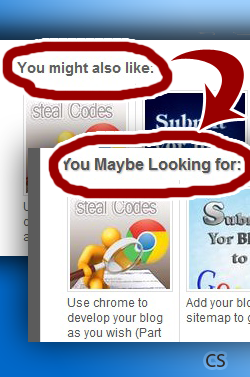
What is LinkWithin Widget?
It's a widget that will boost your traffic.How........? It'll show some random post of your blog, (see below this post) below every post. most of bloggers use it.
Cuz readers can spot some interesting post easily with this widget. So they won't leave your blog early.
Add the widget by from official site
But there is no option to change its text or text style. but here i have found a easy way to customize them.
|
|
|
|
|
|
|
|
|
|
|
|


Subscribe to:
Posts (Atom)
